 FIXSIM
Last updated: August 13, 2026
Session Reports
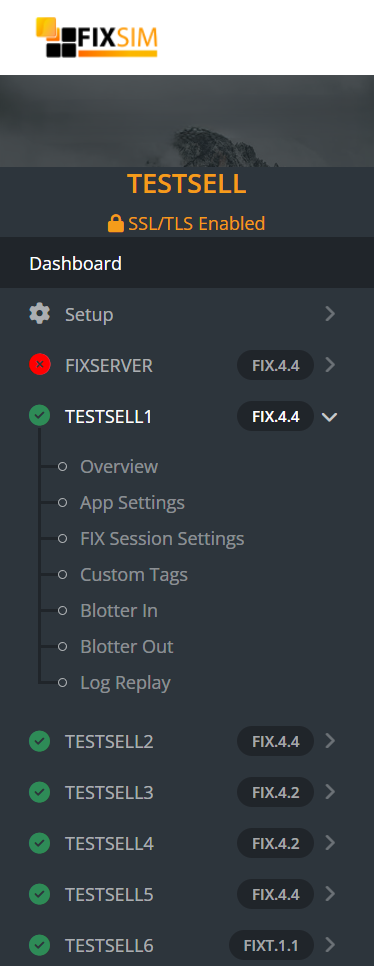
Each FIXSIM Session has views and settings that apply only to itself. Under each session in the sidebar menu, you can select the report you wish to view:
- Overview - Live FIX message traffic
- App Settings - Default application behavior for this session
- FIX Session Settings - Modify FIX session settings for this session
- Custom Tags - Define standard/custom tags to override per message type.
- Blotter In - Orders received IN to FIXSIM, sent from your application.
- Blotter Out - Orders sent OUT from FIXSIM to your application.
- Log Replay* - Replay FIX message logs and download logs. *Available in some pricing tiers.
Overview
A real-time view of the FIX message traffic between FIXSIM and the connected FIX application. Watch live traffic, drill into any message to see raw FIX with tag descriptions, and send messages manually: heartbeats, test requests, orders, executions, or pasted raw FIX messages. See Overview report for details.
App Settings
Configure the session's default application behavior: auto acknowledging orders, auto execution modes (full, multiple, partial, custom), cancel/correct handling, raw message options, and blotter sweep schedules. See App Settings report for the full list of settings.
FIX Session Settings
Update the session's sequence numbers (SendingSeq / RcvdSeq) to resequence with a counterparty or trigger resend requests, and modify session properties such as CompIDs, FIX version, data dictionaries, TLS options, and start/end times. See FIX Session Settings report for details.
Custom Tags
Define standard or custom FIX tags to be added automatically to specific message types when they are generated and sent. Tag values can be hardcoded or randomly selected from a list. See Custom Tags report for examples.
Blotter In
A traditional OMS-style blotter of incoming orders received by the FIXSIM session, showing order state, execution count, executed quantity, and average price. See Blotter In report.
Blotter Out
The same OMS-style blotter view for orders sent out from the FIXSIM session, with order state and execution details as reported back by the counterparty. See Blotter Out report.
Log Replay
Upload a log file of FIX messages (SOH or pipe delimited) to replay through the session, view statistics on replay performance, and download the session's logs for a chosen time range. Available in some pricing tiers. See Log Replay report for details.
