 FIXSIM
Automate FIX Regression Testing in CI/CD
Run FIX protocol regression tests in Jenkins, GitHub Actions, GitLab, or CircleCI, without maintaining a FIX engine in your test repo. Concrete examples, three approach comparisons, and patterns that work in production.
- REST API for headless CI/CD
- Rule Builder encodes venue behavior once
- Fresh, isolated sessions per test run
TL;DR
Add FIX regression to your CI/CD pipeline by calling the FIXSIM REST API from Jenkins, GitHub Actions, GitLab, or CircleCI. Each pipeline run spins up a fresh, isolated FIX counterparty session; your tests assert outcomes; the build fails on regression. No FIX engine code in your test suite, no servers to maintain, no need for every CI contributor to manage a FIX engine themselves. FIXSIM is built on the open-source QuickFIX engine library, so your team gets a stable protocol implementation with a SaaS UI, REST API, multi-user accounts, and log replay layered on top.
What "FIX regression in CI/CD" actually means
When your trading system code changes (a new order type, a sequence-number bug fix, a venue-specific tag), you need to prove the change didn't break:
- Session-layer behavior (logon, heartbeat, resend, sequence recovery)
- Order lifecycle (NewOrderSingle → Ack → ExecutionReport → Fill / Cancel / Reject)
- Negative paths (rejects, sequence gaps, malformed messages)
- Venue-specific quirks (custom tags, time-in-force, asset-class differences)
- Performance regressions (latency, throughput)
The hard part isn't running tests; it's reliably spinning up a FIX counterparty in CI without dedicated infrastructure.
Setting up FIX regression with FIXSIM
FIXSIM exposes every action (create session, send order, assert state) over REST. Your test suite makes HTTP calls; FIXSIM handles the FIX protocol on top of the QuickFIX engine.
The integration pattern is straightforward: a CI step calls the REST API to spin up a fresh, isolated FIX counterparty session, run a deterministic scenario, and assert the result. Your test code looks like ordinary HTTP-driven testing: no FIX engine, no Docker-bound counterparty container, no per-job infrastructure.
Full API reference, request/response shapes, authentication, and worked CI examples for Jenkins, GitHub Actions, GitLab CI, and CircleCI are available in your account portal once you start a trial.
What this gives your QA team
- Each test run is a fresh, isolated session; no state bleed.
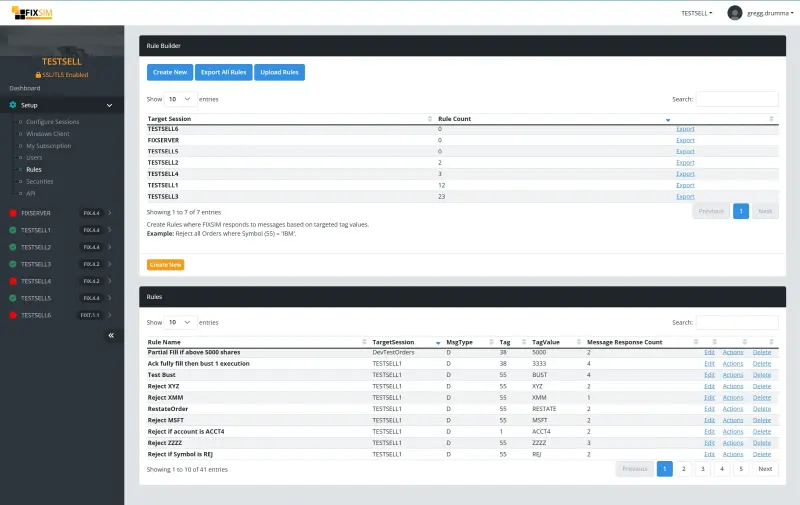
- The Rule Builder lets you encode venue-specific behavior once and reuse it across your regression suite.
- Test reports flow back into your CI dashboard like any other test.
- No FIX engine code in your repo.
- Same regression scenarios usable manually in the browser blotter when a developer needs to step through a failure.
Add FIX regression to your CI/CD pipeline without managing a counterparty yourself.
Built on the QuickFIX engine
Under the hood FIXSIM uses QuickFIX, the open-source FIX engine library that has been a reference implementation since 2000. Your regression suite runs against a stable protocol implementation, with the SaaS layer FIXSIM adds on top: browser UI, REST API, multi-user accounts, Rule Builder, log replay, and on-prem deployment on request. The QuickFIX foundation is the same one your production teams (or your customers’ FIX engines) likely already work with. QuickFIX data dictionaries you already have drop in directly.
Patterns that work regardless of tool
Common pitfalls
- Flaky sequence numbers - tests that share a session will randomly fail. Solve by always starting fresh.
- Time-based assertions without time injection - tests fail at midnight UTC. Inject simulated time.
- Counterparty hardcoded to one symbol - your suite passes for AAPL and breaks the first time someone tests with a futures contract.
- No replay capability - when a test fails in CI, the team can’t reproduce locally. FIXSIM’s session-replay and Rule Builder address this directly; teams using QuickFIX typically build a replay layer themselves.
