 FIXSIM
Replay FIX Messages - Troubleshoot FIX Sessions Fast
When something goes wrong in production FIX flow (a stuck order, a sequence gap, an unexpected reject), you need to replay the FIX log against a sandbox to reproduce the issue without touching live markets.
- Drag-and-drop log upload
- Auto-rewrite SendingTime, SeqNum, CheckSum
- Edit the log, re-upload, and replay to test fixes
What "replay a FIX log" actually means
A FIX engine writes every message it sends and receives to a session log. To troubleshoot a production issue you want to:
- Load a captured log (from production, a customer's outage ticket, or yesterday's failing build).
- Replay the inbound side against your system in a test environment: same messages, same sequence, same timing (or accelerated).
- Watch what your system does and compare to production behavior.
- Tweak a message (fix a tag, change a quantity) and re-run to validate fixes.
The challenge: live FIX engines have stateful sequence numbers, time-sensitive fields (SendingTime), and checksums that all need to be regenerated when you alter anything.
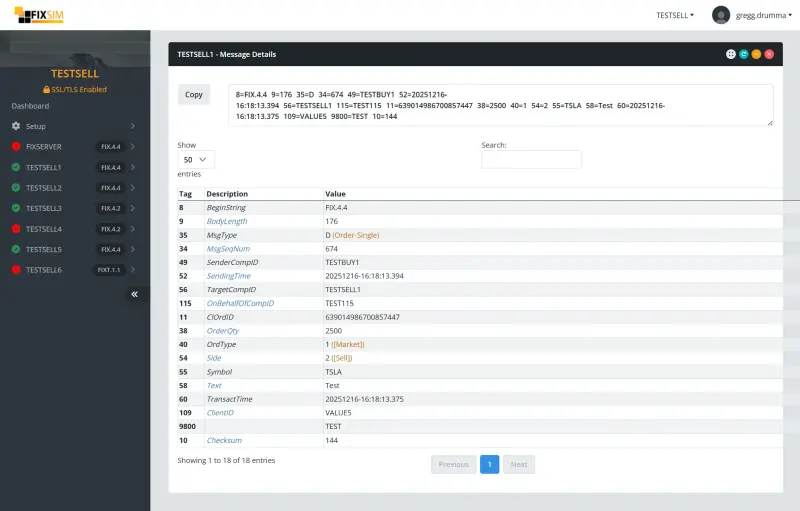
FIXSIM browser-based log replay
Workflow
- Upload the FIX log via the browser (drag-and-drop).
- Pick the role - replay as initiator or acceptor.
- Real-time value replacement - FIXSIM automatically rewrites SendingTime, MsgSeqNum, BodyLength, CheckSum so the replay is valid.
- Filter and step - filter by ClOrdID, OrdStatus, MsgType to zero in on the relevant messages.
- Edit and replay again - change a tag, the qty, or time-in-force in the log file, then re-upload and replay. FIXSIM regenerates BodyLength + CheckSum automatically.
Full step-by-step instructions are in the Log Replay user guide.
Why teams use it for troubleshooting
- No engine code on your laptop - your customer sends a log, you replay it in your browser without setting up a local engine or matching its FIX version.
- Collaborative - share the session URL with a colleague; both of you see the same replay in real time.
- Built-in REST API - script repeatable troubleshooting runs for recurring or scheduled scenarios.
- Multi-version - replay FIX 4.0, 4.2, 4.4, 5.0SP2 logs without version-switching your local engine.
Automation via the REST API
For repeatable or scheduled replays, raw messages can also be injected through the REST API;
a multi-element fixMessages array replays an entire sequence in one call.
Built on the QuickFIX engine
FIXSIM’s replay engine runs on top of QuickFIX, the open-source FIX engine library. That’s why FIXSIM parses every FIX version your counterparties are likely to use (4.0 through 5.0SP2, plus FIXT 1.1) and why custom QuickFIX data dictionaries drop in directly without conversion. You get a stable protocol implementation; FIXSIM adds the SaaS UI, REST API, automatic regeneration of SendingTime, MsgSeqNum, BodyLength, and CheckSum, and multi-user collaboration on top.
Workflow patterns that work
Production outage triage
- Customer sends you their session log + a description of what went wrong.
- Load the log into FIXSIM, replay against a sandbox SUT.
- Identify the message that triggered the issue.
- Edit that message to test hypotheses.
- Hand the customer a reproduction case + recommended fix.
Regression for an old bug
- Save the production log that originally triggered the bug as a fixture.
- Add a CI test that replays the fixture against current code.
- Assert the bug doesn't reappear.
Venue change detection
- Capture a "known good" log from before a venue release.
- After the release, replay the same orders and compare the responses in the message view.
- Any tag that changed stands out against the earlier log.
Common pitfalls
- Forgetting to regenerate checksums - if a message is edited and BodyLength + CheckSum are not recomputed, the SUT rejects it. FIXSIM handles this automatically; a QuickFIX-based replayer needs explicit code for it.
- SendingTime in the past - strict FIX engines reject messages with stale SendingTime. Always rewrite to current time on replay (or configure your SUT to accept historical timestamps in test mode).
- Shared sequence-number state - replaying into a live session with mid-stream sequence numbers will trigger ResendRequests. Always replay into a fresh session.
- Log encoding - production logs sometimes use
\u0001for the SOH delimiter; sometimes literal SOH; sometimes pipe-replaced for readability. Parse defensively.
