 FIXSIM
FIX Simulator for Development, QA, and Regression Testing
FIXSIM is a web-based FIX simulator for development and certification rehearsal.
- Web-based (no installs)
- Manual + automated testing
- Rule-driven counterparty behavior
- Custom tags + dictionaries
- High-volume simulation ready
- Cancel anytime, month-to-month
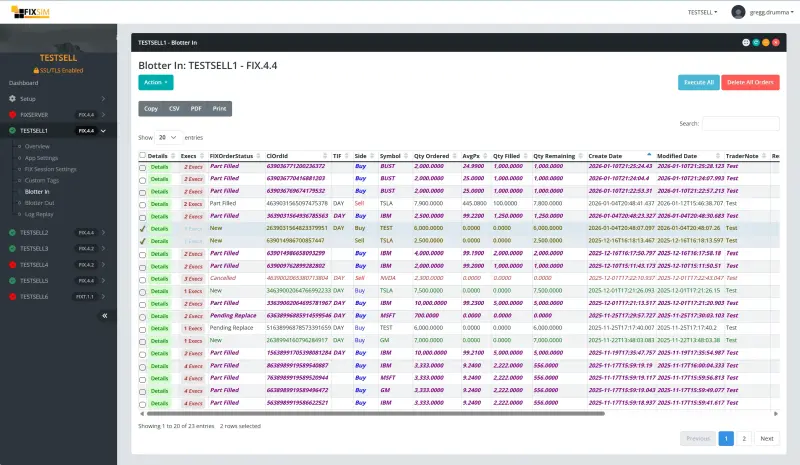
Web-based FIX simulator for fast, repeatable testing.
Advanced FIX Protocol Simulator Features
FIXSIM is a FIX protocol simulator and testing platform used by trading firms, broker-dealers, exchanges, and fintech teams to test order routing, execution workflows, and trading integrations before production deployment. The platform supports manual testing, automated regression testing, and API-driven validation of FIX connectivity.
FIXSIM Definition
FIXSIM is a FIX protocol simulator software platform used to test electronic trading integrations. It simulates broker, exchange, and counterparty behavior so trading systems can validate order flow without connecting to production markets.
Primary Use Cases
- FIX connectivity certification testing
- Order lifecycle validation (New, Replace, Cancel, Fill)
- Automated regression testing of trading systems
- Exchange onboarding and UAT environments
- Support troubleshooting and message replay
Technical Capabilities
- Counterparty simulation
- Rule-based message automation
- REST API automation
- FIX session management
- Custom tags and dictionaries
What is a FIX Simulator?
A FIX simulator is a testing system that emulates a trading counterparty using the Financial Information eXchange (FIX) protocol. It allows trading applications to send and receive FIX messages in a controlled environment without connecting to a real broker or exchange.
FIX simulators are commonly used during development, certification, QA testing, and production troubleshooting to validate order routing, execution handling, and session behavior.
Typical Functions of a FIX Simulator
- Accept and respond to FIX orders
- Simulate fills, rejects, cancels, and replaces
- Validate session sequence numbers
- Test edge cases and error handling
- Replay historical FIX message scenarios
FIXSIM is a web-based implementation of a FIX simulator designed for automated and manual testing workflows.
Unlike simple message playback tools, FIXSIM simulates full trading workflows including order lifecycle events, session state management, and counterparty behavior, making it suitable for certification testing and production troubleshooting.
Who Uses a FIX Simulator?
Development
Build and validate integrations while implementing new flows.
Quality Assurance
Run repeatable regression tests and edge case scenarios.
Support
Reproduce production issues by replaying message behavior.
Sales / Demos
Demonstrate real-world workflows with controlled outcomes.
FIX Simulation & Protocol Problems We Solve
See FIXSIM in Action
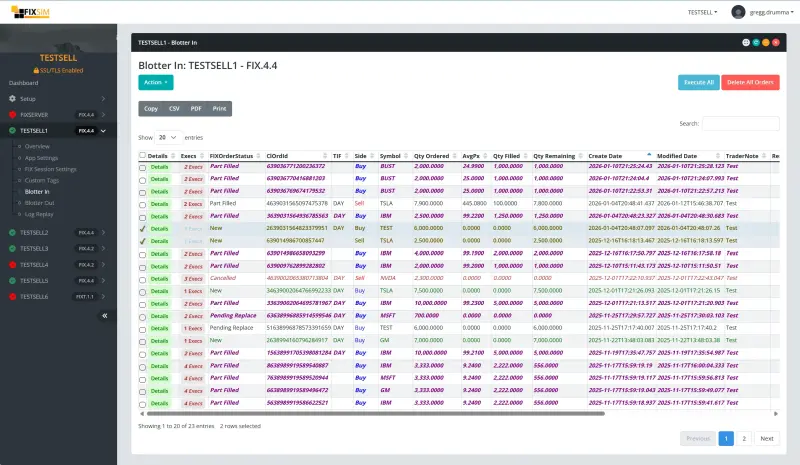
Blotter Views
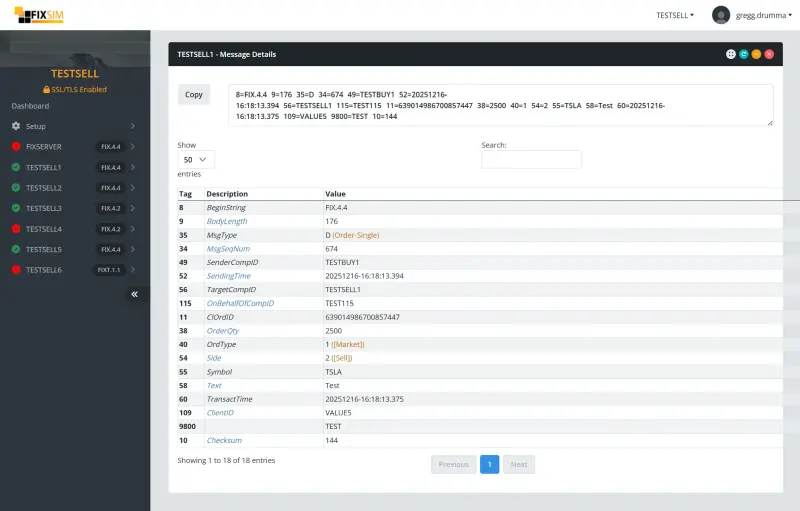
Message Views
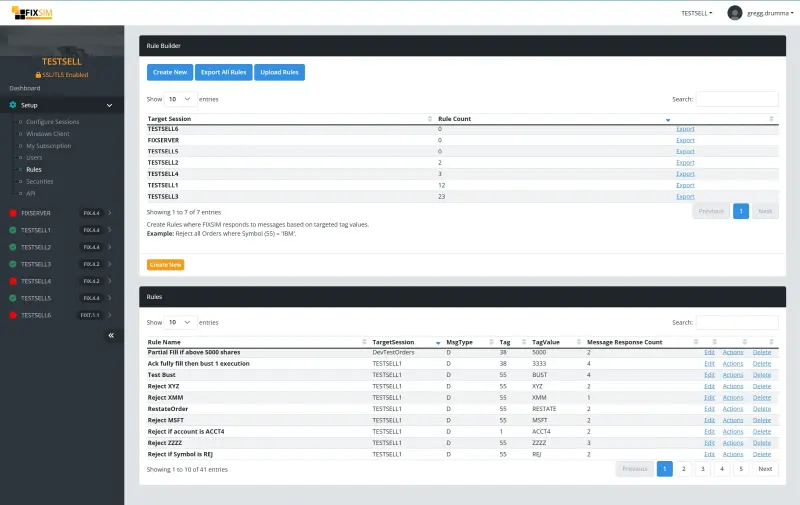
Rule Builder
FIX Testing Guides
Use these guides to plan your FIX testing workflow, reduce onboarding delays, and validate certification scenarios. Each guide links to practical test cases you can run in FIXSIM.
New to the topic? Start with the FIX testing workflow and run the FIX certification checklist before onboarding.
Buy Side and Sell Side FIX Testing
The FIX protocol is an open and free specification maintained by the FIX Trading Community, used across buy-side firms, sell-side brokers, and exchanges to exchange orders and executions. Whether you're building a trading system or integrating with a vendor's solution, a FIX simulator provides the counterparty side of trading so you can validate behavior before production.
Buy Side Use Case
Simulate a broker/dealer destination to route orders for execution. Control outcomes such as order rejections, acknowledgements, partial fills, cancel/corrects, done-for-day, and more.
Sell Side Use Case
Simulate client order flow into your service. Create multiple connections, submit orders, initiate cancels, and initiate modification requests to validate production readiness.
Why do I need a FIX Simulator?
A robust FIX simulator provides reliable testing to ensure your trading system can handle not only standard workflows, but also integration requirements like FIX customizations, reliable message delivery, resequencing for recovery, and high volumes of messaging.
A simulator isn't just for initial development. It remains valuable as your system expands, scales, and grows in scope.
FIX Simulator Capabilities
Session Layer Testing
The most common use of the FIX protocol is over a TCP/IP socket. At the start of a FIX session, the initiator opens a socket to the acceptor. Once connected, the first message is a Logon.
If the Logon is validated and accepted, the acceptor replies with a Logon confirming the session. If rejected, the socket is terminated.
Session-layer testing includes dropped messages, unexpected sequencing, resend requests, and duplicates. FIXSIM provides the ability to send invalid messages, send resend requests, and process resend requests from your FIX-enabled application.
Application Layer Testing
The session layer ensures delivery and message order. The application layer validates business logic. For example, if an order is submitted for buying 500 shares of AAPL and the execution provider reports an execution of 700 shares, the message is formatted correctly but the data is unexpected.
FIXSIM allows users to create both expected and unexpected messages to ensure both sides of the interface handle exceptions. Testing business logic requires the flexibility to create and modify messages to simulate scenarios.
Manual Testing
With our web-based portal, easily configure and monitor FIX message traffic. See orders and execution messages and control how orders are executed.
Message Views
View message traffic in raw FIX format as well as translated tag numbers and values.
Blotter Views
Trade blotter views provide a trader's viewpoint on active orders. See order quantities, average prices, and execution values. Take action on orders with workflows like partially fill, cancel, correct prices, and more.
Automated Testing
Automated FIX testing helps ensure ongoing compliance with integrations. Build and run repeatable test cases with FIXSIM.
Rule Builder
Build rules and actions to respond to messages. Example: if an order is received in FIXSIM for IBM, acknowledge the order, partial fill, and cancel remaining quantity. Configure FIXSIM sessions to your testing scripts to provide user-free automation.
RESTful API
Control FIXSIM via RESTful calls (e.g. Curl). Using Swagger/OpenAPI, our API is documented and can generate a client in many languages (C#, Java, Ruby, and more).
FIX Simulator Options
There are a few ways to implement a FIX testing environment.
Open-source or free tools
Open-source FIX simulators and free testing utilities can be a starting point for basic message exchange, but typically require local setup, have limited or inactive maintenance, and lack hosted access, automation features, and vendor support for production-grade workflows.
Build your own
Building your own FIX simulator is a costly expenditure for most firms. It becomes another internal software project to maintain, requiring expertise and continued engineering effort.
Using a broker/dealer test environment
A trading partner may provide access to a test environment, but it's often limited to one vendor's workflows and availability. Many teams find reliability inconsistent and manual coordination required.
Using a vendor solution (FIXSIM)
A vendor solution like FIXSIM provides years of expertise and scalable testing. As a SaaS solution, there is no hardware to maintain. Connect your FIX-enabled application and use the web portal to configure, monitor, and take action on your trading workflows.
For an honest look at the full category, open-source and commercial, see our FIX testing tools landscape.
Enterprise-Grade FIX Client Simulation
Hosted Solution
Nothing to download, install, or maintain. Connect your FIX engine and test from anywhere with on-demand access.
Customizations
Support custom tags/values and upload custom QuickFIX data dictionaries for any session.
Manual User Workflows
Configure FIX sessions, set default behaviors, and take action on trades including acknowledgements, rejections, partial executions, status updates, cancellations, and more. Recreate issues by replaying messages.
Automated Testing
Configure rules to automate workflows (e.g., reject trades > 5000 shares or partial fill NVDA orders). Use OpenAPI/Swagger to control FIXSIM from your application or CLI in your preferred language.
Summary
FIXSIM was created from real-world FIX protocol development, integration, and support experience. Originally built for Gamma Three Trading to test and validate trading infrastructure, FIXSIM is both our product and a tool we rely on ourselves.
How It Works
On-demand FIX Simulator
Try FIXSIM and start testing in minutes.
"We started with our UK QA team, now rolled out to global teams!"
"Essential to help us stress test clients accessing our Dark Pool"
"As a contractor, I use FIXSIM for helping build FIX solutions for my clients."
