 FIXSIM
Last updated: August 13, 2026
Securities
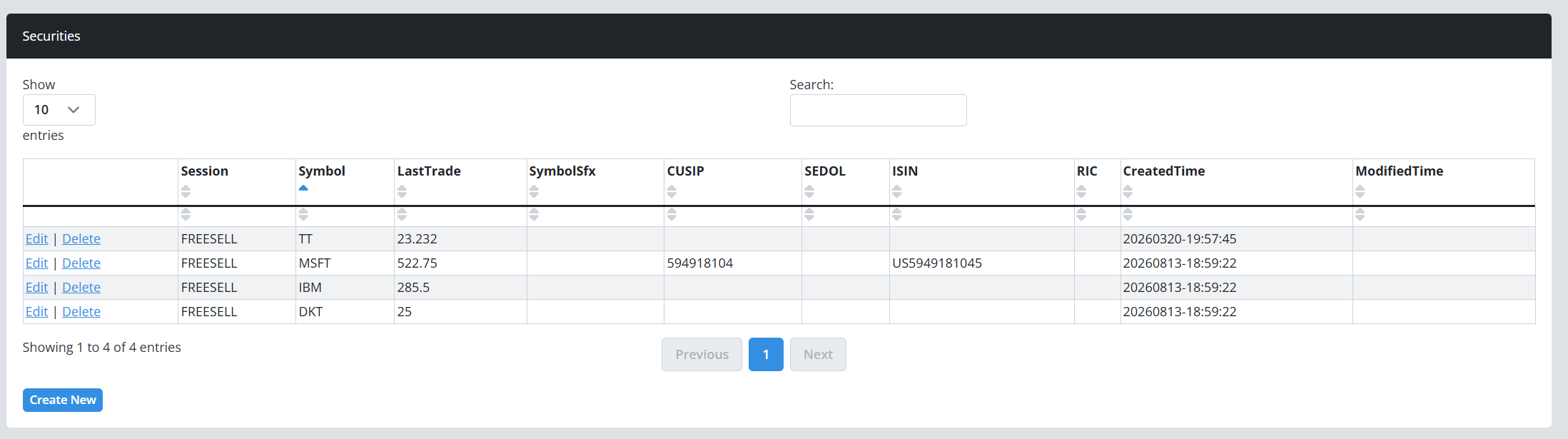
The Securities page is your instance's security master: the symbols FIXSIM knows about, their identifiers, and the prices the simulator uses when it executes orders and answers market data requests. It is managed under Setup → Securities in the portal sidebar, available to ClientAdmin and PowerUser roles.
Defining securities is optional. You can send orders for any symbol; for symbols FIXSIM does not know, it looks up a live price for real listed tickers and otherwise falls back to a default price. Define a security when you want the price to be deterministic and under your control, which is exactly what repeatable test scenarios need.
How securities drive the simulation
- Execution pricing - when FIXSIM prices a fill (a market order, or any execution without an explicit price), it resolves the symbol's price in this order: the price cache, then your security's Last Trade, then a live lookup for real listed symbols, then a default of 25.00. A Last Trade you define wins that race every time, so the same order flow produces the same fill prices run after run.
- Market data - responses to Market Data Requests (35=V) use the security's Bid and Offer where defined, deriving any missing side around the current price.
- Limit enforcement - with the App Settings option Enforce Limit Orders Current Mkt Price enabled, FIXSIM executes a limit order only when its price meets or beats the current simulated market price. Setting Last Trade lets you steer exactly which limits fill in a scenario.
-
Currency pairs - symbols containing a slash (for example
EUR/USD) are priced from live FX rates rather than the security master.
Price changes take effect on the next execution for that symbol; FIXSIM clears its cached price whenever you save the security.
Adding a security
Click Create New and fill in the fields you need. Symbol is required, is stored uppercase, and must be unique within your instance (a duplicate is rejected). For most equity testing, Symbol plus the prices you care about are all you need; the rest of the form is there when a scenario calls for realistic instrument reference data.
| Field group | Fields |
|---|---|
| Pricing | Bid, Offer, Last Trade, Round Lot |
| Identifiers | CUSIP, SEDOL, ISIN, RIC, Bloomberg, Valoren, Symbol Suffix |
| Classification | Asset Type, Product, CFI Code, Security Type and SubType, Security Exchange, Issuer, Country, Currency |
| Fixed income | Maturity Month/Year and Date, Coupon Rate, Coupon Payment Date, Issue Date, Dated Date, Factor, Interest Accrual Date |
| Derivatives | Put/Call, Strike Price, Strike Currency, Contract Multiplier, Option Attribute |
| Custom | Eight numeric and eight text user-defined fields, plus a free-form Note |
The identifier fields pair naturally with instrument-identified flows: an order carrying 22=4 (ISIN) resolves against the same security as one carrying the ticker, and the fixed-income fields support bond scenarios like the corporate bond example on the Sample FIX Messages page.
The custom fields are useful alongside Custom Tags when a counterparty scenario needs extra per-instrument data.
Editing and deleting
Edit updates a security in place; the new prices apply to the next execution for that symbol. Delete removes it from the security master; orders and executions already in your blotters are unaffected, and future orders for that symbol simply fall back to looked-up or default pricing.
Scripted setup via the REST API
The REST API's Securities endpoint group lists, adds, and updates securities programmatically. A common CI pattern is to seed the security master (symbols and Last Trade prices) at the start of a test run so every fill price in the suite is predetermined, then assert exact execution prices downstream.
To control how fills are shaped rather than priced, see the ExecMode options in App Settings, or trigger executions conditionally with the Rule Builder.
