 FIXSIM
App Settings Report
The App Settings report allows the configuration of default behavoir for the FIX session. Behvaoirs such as auto acknowledging orders, auto execution of orders, and more can be configured here.
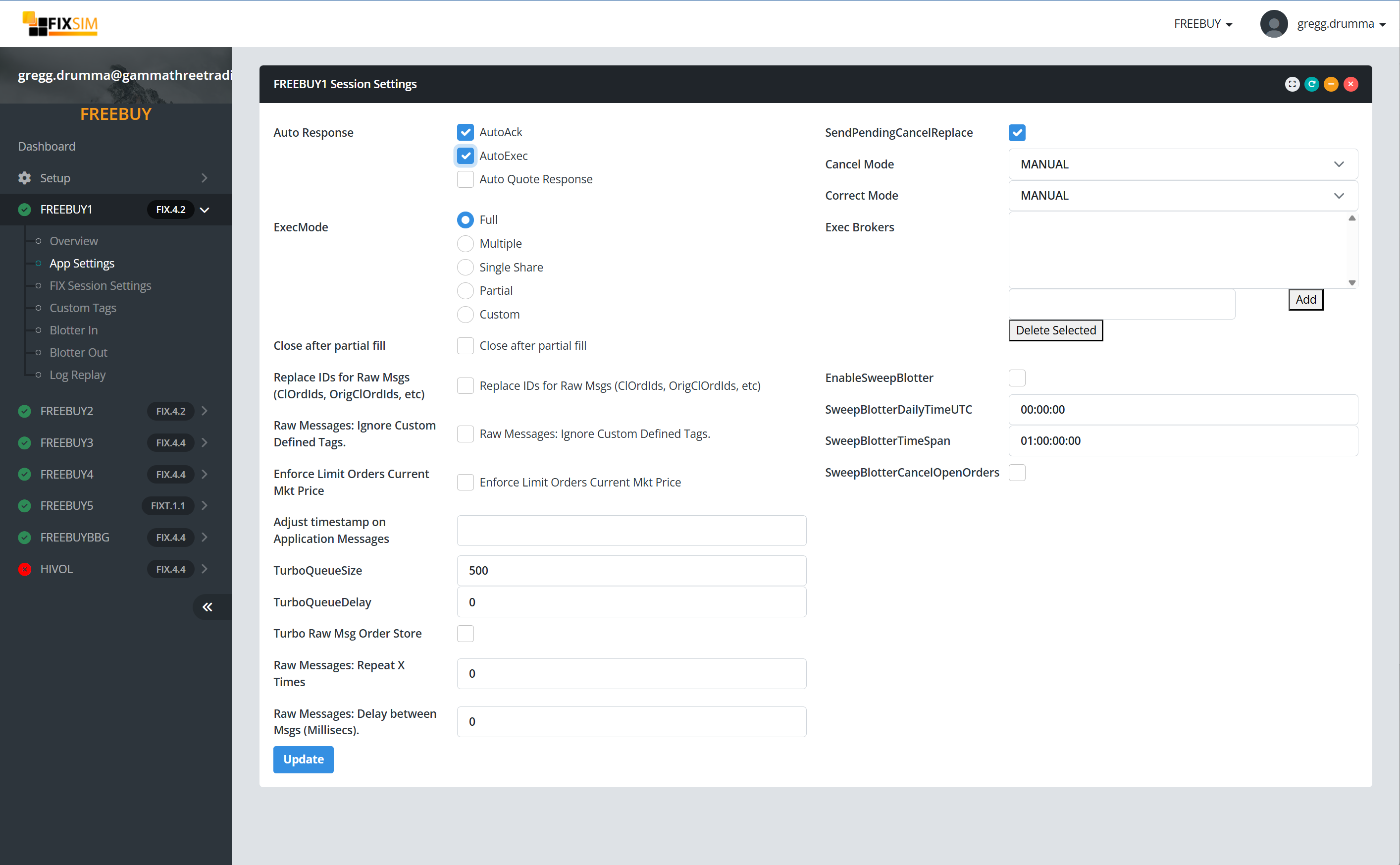
Settings
| Setting | Description |
|---|---|
| Auto Response |
|
| ExecMode |
|
| Close After Partial Fill | When an order is partially filled, send OrdStatus set to Done For Day (39=3) to close order for the day. |
| Replace IDs for Raw Msgs (ClOrdIds, OrigClOrdIds, etc) | When enabled, Raw Messages sent through FIXSIM will have their Identifier replace by FIXSIM to ensure uniqueness. The ID/Tag is determined by the message type. For example D = ClOrdId(11), 8 = ExecId (17), etc. |
| Raw Messages: Ignore Custom Defined Tags. | If custom tag values are defined for the Session under the Custom Tags report, by default those tags will be added/modified in the raw messages that are sent. If you wish to supress this behvoir and only send tags included in the raw message, then enable this setting. |
| Enforce Limit Orders Current Mkt Price | FIXSIM will attempt to find a current price for a equity security if possible. If a price is discovered and you have submitted a Limit order to FIXSIM and this seeting is enabled, the trade will not execute unless the price is in the range of the limit. For example, if a Buy 100 IBM at 112.30 and the current market price is 115.64, the order will NOT execute until price meets 112.30 |
| Raw Messages: Repeat X Times | When sending a log file of raw messages, providing a value here will repeat the sending of the list of messages X times. For example, loading a log file with 10 messages, setting a value here of 10 has the file repeated 10 times for a total of 100 messages. |
| Raw Messages: Delay between Msgs (Millisecs). | Set a value for a pause between sending each message in the log file. For example, a value here of 1500 enables a pasuse of 1.5 seconds (1500 ms) between each message. |
| SendPendingCancelReplace | Option to immediately acknowledge either a Cancel Request (F) or Cancel/Replace (G) with a Execution Report with order status E, Pending Cancel/Replace. |
| Cancel Mode |
|
| Correct Mode |
|
| Exec Brokers | In some cases the execution broker/dealer is only known upon receipt of an execution report where the broker code is provided on a tag. For FIX.4.2 and early this is often FIX tag 76 (ExecBroker). In 4.3 and above, repeating group NoParties and the tag 448 (PartyID) is used. Providing a list of broker codes here populates either 76/448 with a randomly chosen value from this list for each execution. |
| EnableSweepBlotter | Enable the deletion of old orders on the blotters at the Daily Sweep Blotter time below. |
| SweepBlotterDailyTimeUTC | Time in UTC of when to execute a "sweep" of the blotters. Orders and executions older than the duration provided in Sweep Blotter Time Span are cleared form the blotter. |
| SweepBlotterTimeSpan |
The time span for which orders/executions older than this timespan are swept at Sweep Blotter time. The format is: Days.Hours:Minutes:Seconds
For example, to delete orders/executions older than 1 day, the value would be: 1.00:00:00 To delete orders greater than a week old, it would be: 7.00:00:00 |
| SweepBlotterCancelOpenOrders | Option to have FIXSIM send a cancel for each open order before sweeping the old orders/executions. |
