 FIXSIM
FIX Session Settings
The FIX Session Settings report provides the ability to update:
- Sequence Numbers : Modify the current sending / received sequence numbers for this session.
- FIX session settings : Change properties of the FIX session, like Sender/Target CompIDs.
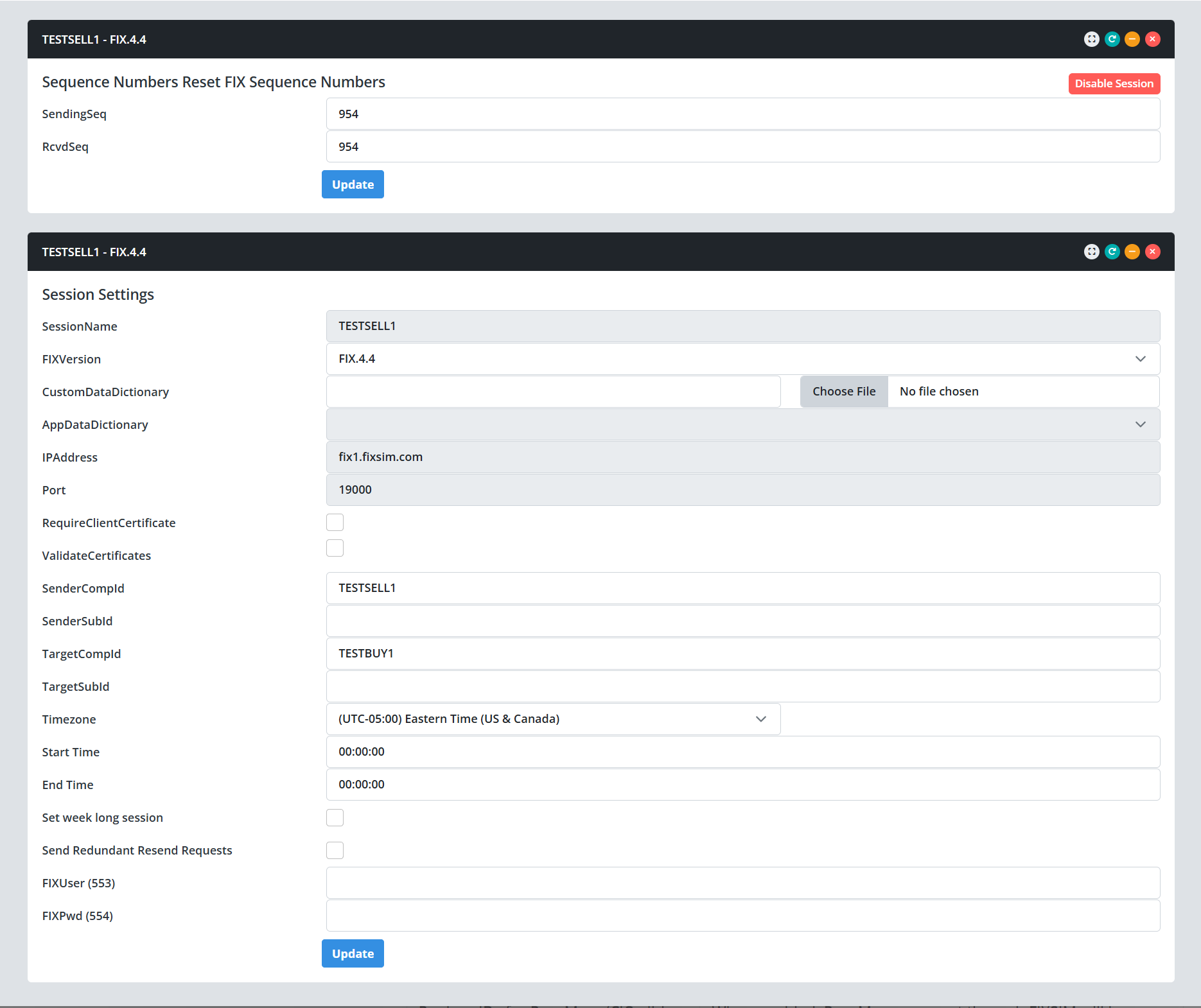
Sequence Numbers
Update the sequence numbers of the FIX session to resequence with counter party or trigger resend requests.
| Setting | Description |
|---|---|
| SendingSeq | |
| SendingSeq |
FIX Session Settings
Modify properties of the FIX session.
| Setting | Description |
|---|---|
| SessionName | Name of session, readonly. |
| FIXVersion | Dropdown to select FIX version for this session. |
| Custom Data Dictionary | Upload a custom FIX Datadictionary XML file to specifiy modified tags / requirements. Upload a QuickFIX formatted datadictionary. |
| AppDataDicionary | When using FIX 5.0 (FIXT.1), you must specify which version of FIX that will be used. Only applies to FIX 5.0 or higher. |
| IPAddress |
The IP Address of the FIX Session. If FIXSIM is configured as a FIX acceptor, this value will be read only and informs the user of what address to connect their FIX initiator to. If FIXSIM is configured as a FIX Initiator, the field is editable to allow the user to configure which IP address the FIXSIM session should target. |
| Port | Like the IPAddress, if FIXSIM is configured as a FIX acceptor, this value will be the assigned port and will not be editable. If FIXSIM is a FIX initiator, the field is editable to allow the user to specify the target port for FIXSIM to connect to. |
| RequireClientCertificate | IF FIXSIM is a FIX acceptor and TLS encryption is enabled this setting allows the user to require the client to send a certificate in TLS handshake. |
| ValidateCertificates | If FIXSIM reqceives a TLS client certificate and this is enabled, FIXSIM will use it's approved CA store to valide certificate is signed and valid with trusted authority.' |
| SenderCompID | FIXSIM session's SenderCompID' |
| SenderSubId | Optional setting to provide a SenderSubId with messages. NOTE: For a successful logon, the other side must be configured with a TargetSubId that matches this value. |
| TargetCompId | FIXSIM session's TargetCompID' |
| TargetSubId | Optional setting to provide a TargetSubId on messages sent. NOTE: For a successful logon, the other side must be configured with a SenderSubId that matches this value. |
| Timezone | Timezone used for configuring the start and end times for this session. |
| Start Time | Time of day that the session will start. |
| End Time | Time of day the session will end/logout. |
| Set weeklong session> |
Enable/Disable a weeklong session. If enabled, the following settings are enabled:
|
| End Time | Time of day the session will end/logout. |
| Send Redundant Resend Requests | If set to Y, QuickFIX will send all necessary resend requests, even if they appear redundant. Some systems will not certify the engine unless it does this. When set to N, QuickFIX will attempt to minimize resend requests. This is particularly useful on high volume systems. |
| FIXUser | Opitional Tag to provide username on logons. |
| FIXPwd | Optional Tag to provide a password on logons. |
