 FIXSIM
FIX Simulator for Development, QA, and Regression Testing
FIXSIM is a web-based FIX simulator for development and certification rehearsal.
- Session + application layer
- Trade blotters
- Realtime traffic view
- Control fills/cancels/rejects
- Rule Builder automation
- REST API for scripts / CI
- From $500/month, no installs
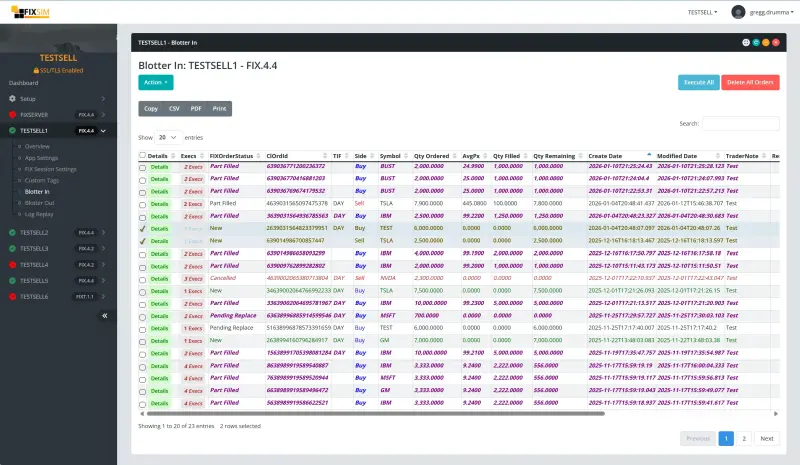
Web-based FIX protocol testing — manual or automated.
What is FIX Protocol Testing?
FIX protocol testing is the process of validating that a trading application correctly sends, receives, and processes messages over the Financial Information eXchange (FIX) protocol. It includes verifying session-layer behavior (logon, sequence numbers, resend requests, duplicates, recovery) and application-layer behavior (order acknowledgements, executions, cancels, rejects, replaces, custom tags, and counterparty-specific business logic).
Trading firms, broker-dealers, exchanges, OMS/EMS vendors, and fintech integration teams test their FIX implementations before connecting to a counterparty in production. Testing reduces certification time, catches edge cases that only appear under unusual session conditions, and provides repeatable regression coverage as integrations evolve.
FIX Protocol Testing Definition
FIX protocol testing is a structured set of validation activities performed against a FIX-enabled application to ensure it can handle the full range of session and business workflows expected in production. It typically combines manual exploratory testing with automated regression scenarios that exercise both common cases and edge conditions.
Typical FIX Protocol Testing Activities
- Session establishment, logon, and sequence number management
- Order lifecycle validation: New, Replace, Cancel, Fill, Done-for-Day
- Resend request handling and gap-fill recovery
- Counterparty-specific business logic and custom tag handling
- High-volume and stress testing under realistic order rates
- Certification rehearsal before connecting to a new venue or broker
- Regression testing across releases and infrastructure changes
Who Uses FIX Protocol Testing Tools?
OMS / EMS Developers
Test integrations faster by simulating broker/exchange behavior and controlling responses.
QA & Test Engineers
Build repeatable regression tests, simulate edge cases, and validate outcomes without waiting on counterparties.
Trading Integrations Specialists
Validate session reliability, message compliance, and business logic before production releases.
Common FIX Protocol Testing Problems We Solve
FIX Protocol Testing Approaches
There are several ways to set up a FIX testing environment. Each has tradeoffs in setup time, ongoing maintenance, and coverage.
Open-source or free utilities
Free FIX testing tools and command-line utilities can exchange basic FIX messages, but typically require local setup, have limited or inactive maintenance, and lack hosted access, automation features, and vendor support. Useful for first experiments; not enough for production-grade testing.
Build your own
Building an internal FIX simulator is a significant engineering project. It becomes another internal codebase to maintain, requires deep FIX expertise, and rarely receives ongoing investment proportional to its importance during incidents and certification cycles.
Counterparty test environments
A broker, exchange, or vendor may provide a test environment, but it's specific to that one counterparty's workflows and availability. Many teams find reliability inconsistent and manual coordination required to set up specific scenarios.
Vendor solution (FIXSIM)
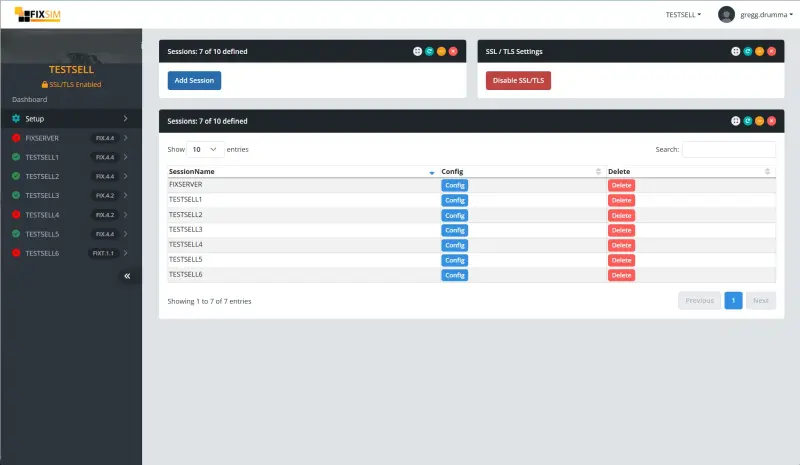
A purpose-built vendor solution like FIXSIM provides hosted access, validated FIX behavior, automation features, and ongoing support. As a SaaS solution, there's no infrastructure to maintain. Connect your FIX-enabled application and use the web portal to configure sessions, monitor traffic, and act on workflows.
For a side-by-side look at how FIXSIM compares to alternatives, see our FIX testing tools comparison.
Why do I need FIX Protocol Testing?
FIX integrations don't fail uniformly. They fail in narrow, specific ways: an unexpected sequence number, a malformed custom tag, a counterparty that rejects orders above a particular threshold, a resend request that arrives during a partial fill. These edge cases rarely appear in normal connectivity testing, but they cause production incidents and trigger certification delays.
Robust FIX testing ensures your trading system can handle not only standard workflows, but also session recovery, custom tag requirements, high-volume scenarios, and exception paths. A simulator gives you controlled inputs so you can reproduce specific behaviors on demand instead of waiting for them to occur in production.
Testing isn't just for initial development. It remains valuable as your trading system expands, scales, and evolves through new venues, new asset classes, and new counterparties. Each new integration introduces new ways things can go wrong, and a stable testing environment lets you validate before you connect.
Why certification cycles take longer than expected
Many teams assume delays come from connectivity or FIX engine configuration. In practice, delays usually happen when specific trading behavior must be reproduced during certification windows. See why FIX onboarding takes longer than planned.
Before starting certification, teams often validate message lifecycles internally. Here's a practical FIX testing workflow used by trading teams.
See FIXSIM in Action
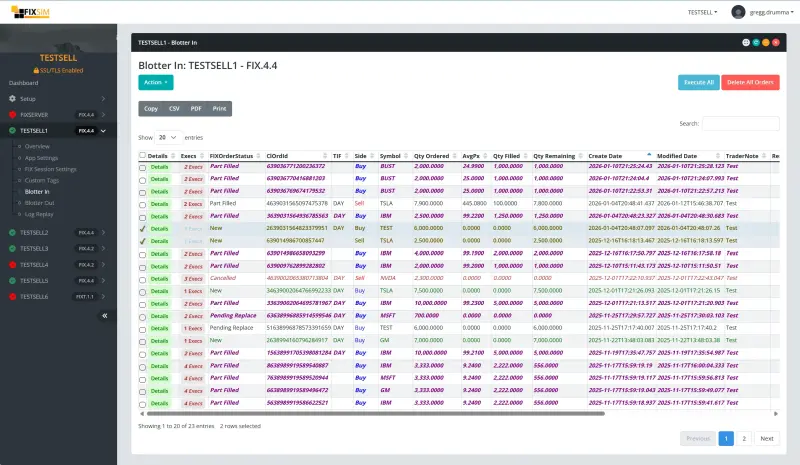
Blotter Views
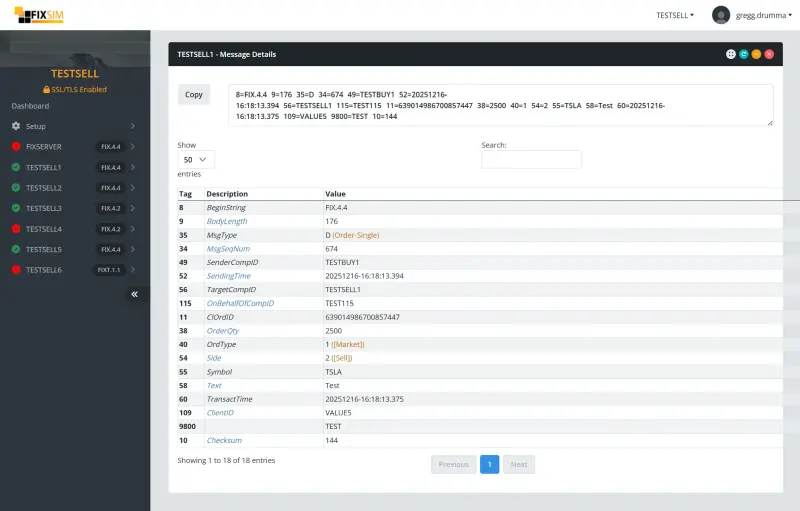
Message Views
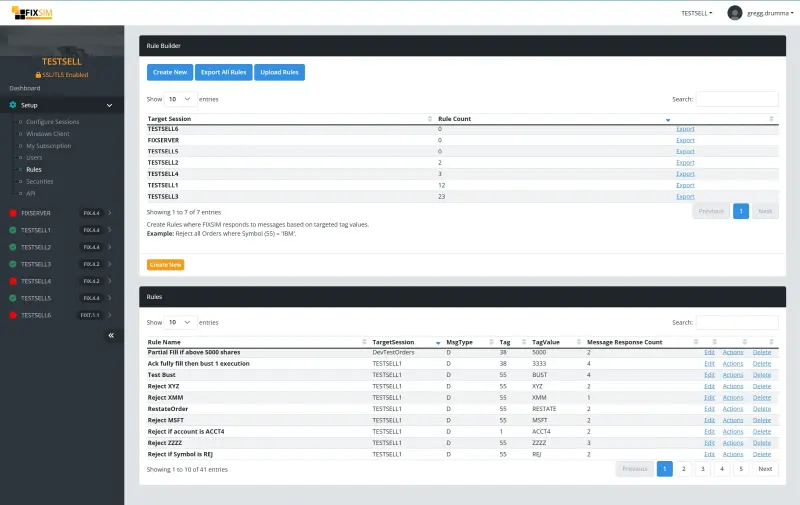
Rule Builder
FIX Testing Categories
Session Layer Testing
The most common use of the FIX protocol is over a TCP/IP socket. At the start of a FIX session, the initiator opens a socket to the acceptor. Once connected, the first message is a Logon.
If the Logon is validated and accepted, the acceptor replies with a Logon confirming the session. If rejected, the socket is terminated.
Session-layer testing includes dropped messages, unexpected sequencing, resend requests, and duplicates. FIXSIM provides the ability to send invalid messages, send resend requests, and process resend requests from your FIX-enabled application.
Application Layer Testing
The session layer ensures delivery and message order. The application layer validates business logic. For example, if an order is submitted for buying 500 shares of AAPL and the execution provider reports an execution of 700 shares, the message is formatted correctly but the data is unexpected.
FIXSIM allows users to create both expected and unexpected messages to ensure both sides of the interface handle exceptions. Testing business logic requires the flexibility to create and modify messages to simulate scenarios.
Manual Testing
With our web-based portal, easily configure and monitor FIX message traffic. See orders and execution messages and control how orders are executed.
Message Views
View message traffic in raw FIX format as well as translated tag numbers and values.
Blotter Views
Trade blotter views provide a trader's viewpoint on active orders. See order quantities, average prices, and execution values. Take action on orders with workflows like partially fill, cancel, correct prices, and more.
Automated Testing
Automated FIX testing helps ensure ongoing compliance with integrations. Build and run repeatable test cases with FIXSIM.
Rule Builder
Build rules and actions to respond to messages. Example: if an order is received in FIXSIM for IBM, acknowledge the order, partial fill, and cancel remaining quantity. Configure FIXSIM sessions to your testing scripts to provide user-free automation.
RESTful API
Control FIXSIM via RESTful calls (e.g. Curl). Using Swagger/OpenAPI, our API is documented and can generate a client in many languages (C#, Java, Ruby, and more).
How It Works
FAQ
Using FIXSIM for Testing
FIXSIM was designed to be a web-based solution that requires no software downloads. Simply connect your FIX engine to FIXSIM and manage your FIX sessions via our web portal. FIXSIM is the work of many years experience integrating FIX trading destinations.
With month-to-month pricing, you can start testing immediately with no long-term contracts.
FIX Testing Guides
Use these guides to plan your FIX protocol testing workflow, reduce onboarding delays, and validate certification scenarios. Each guide links to practical test cases you can run in FIXSIM.
New to the topic? Start with the FIX testing workflow and run the FIX certification checklist before onboarding.
On-demand FIX testing via the Web
Try FIXSIM!
Customer Recommendations Join hundreds of users across trading firms worldwide who use FIXSIM. We're also our own customer!
"We started with our UK QA team, now rolled out to global teams!"
"Essential to help us stress test clients accessing our Dark Pool"
"As a contractor, I use FIXSIM for helping build FIX solutions for my clients."
